Retractable USB-C Cables: What You Gain and What You Give Up
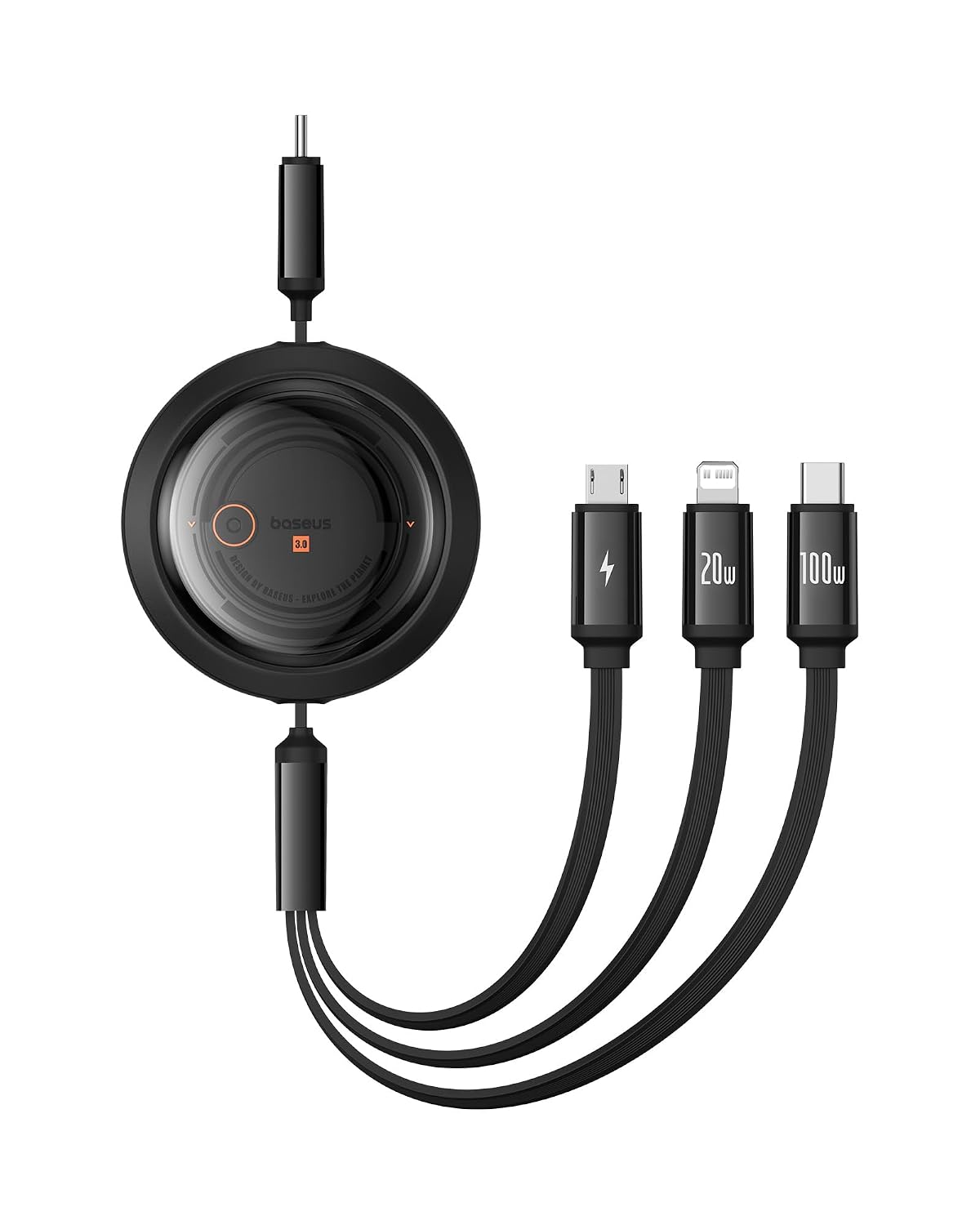
Open the front pocket of any bag that travels regularly and you will find the same scene: three cables knotted around each other, one of them frayed at the connector, and none of them the length you need right now. The one-metre cable is too long for the desk and too short for the bed. The 25cm one is perfect for a power bank in your pocket and useless everywhere else. So you carry both, and they tangle.
Retractable cables exist to collapse that pile into one object. It is a good idea with a real cost attached, and the cost is not obvious until you have owned one for a year.
How a retractable cable actually works
Inside the housing is a spool with the conductor wound around it, plus a spring and a ratcheting lock. You pull the connector out, the ratchet catches at fixed stops, and the cable holds at that length. Pull slightly further to release the ratchet and the spring reels it back in.
Two consequences follow from that design and they explain almost every complaint people have.
First, the lengths are preset, not continuous. You get the stops the manufacturer built in. If none of them suits your desk, you cannot fix it.
Second, the conductor is being coiled and uncoiled repeatedly. A normal cable flexes in a few places. A retractable one is engineered to flex constantly across its whole length. Good ones handle it. Cheap ones develop an intermittent connection somewhere in the middle of the spool, which is the worst kind of fault because you cannot see it.
The specs that matter
Wattage and data speed are separate things. This trips up more buyers than anything else in the USB-C world. A cable rated for 100W of Power Delivery may still carry data at USB 2.0 speeds — 480 Mbps — because high-wattage charging and high-speed data use different wires in the connector. A 100W rating tells you nothing about whether the cable can move a video signal or a fast file transfer.
Whether it carries video at all. Most retractable cables are charge-and-data only, with no DisplayPort alt mode. If you want to run a monitor off your laptop's USB-C port, a retractable cable is generally the wrong tool. That is a job for a dedicated video cable or a dock.
The e-marker chip. Any cable claiming more than 60W needs an e-marker chip so the charger and device can negotiate the higher current safely. Cables that claim 100W without one are lying about something, and this is the category where uncertified no-name products are genuinely worth avoiding.
Housing size. The spool has to live somewhere. Retractable cables are chunkier in the middle than a coiled braided cable of the same length, and that lump has to fit wherever you were planning to stash it.
The lock mechanism. This is the part that fails. If you can, find out whether the ratchet holds under a sideways tug, because a cable that retracts itself while your phone is charging on a car seat is worse than no cable.
Where they genuinely help
Travel is the clear win. One cable that adjusts instead of three that tangle is a real reduction in bag chaos, and the retract action means you are not winding it by hand at the airport gate while boarding is announced.
Cars are the second win. A short length keeps the cable off the gearstick and out of the footwell, and you can extend it when a passenger in the back wants a charge.
Shared desks and hot-desking also suit them. The cable retracts into a tidy puck at the end of the day rather than living as a loop across someone else's workspace.
And a retractable cable ends the specific annoyance of the cable that keeps sliding off the desk edge onto the floor, because you can set it to exactly the length that reaches your chair and no further.
Where they disappoint
They cost several times what a plain cable costs. You are paying for a mechanism, not for better conductors.
They are a wear item with a defined lifespan. A braided cable with a good strain relief can last five years of gentle use. A retractable one has a spring, a ratchet and a constantly flexing conductor, and all three have failure modes. When it goes, it goes for good — nobody repairs these.
The preset stops will annoy you eventually. There is always one situation where the cable is 10cm too short and the next stop is 30cm too long.
Most of them are USB 2.0 for data. If you regularly move large files off an SSD or a camera, this cable will feel slow, and no amount of charging wattage compensates.
Skip retractable cables entirely if the cable is going to live permanently plugged in behind your desk. A fixed cable in a fixed place gains nothing from a retraction mechanism and loses reliability by having one. For that job, a plain cable dressed into an under-desk cable tray is the better answer.
Getting the most out of one
Let the spring do the retracting rather than shoving the cable back in by hand — forcing it is how the spool jams. Pull from the connector housing, never from the cable itself, and release the lock deliberately instead of yanking. Keep it out of the same pocket as your keys; the housing is plastic and it scratches into a haze that eventually cracks.
If you are consolidating your bag anyway, the other half of that job is ports rather than cables. A USB-C hub covers the HDMI, card reader and USB-A gaps that a single cable was never going to fill.
The one we have listed
We list the Baseus Free2Draw Retractable USB-C Cable 100W at ₹2,210 on Amazon.in, rated 4.5 out of 5 across 1,500+ reviews.
It locks at multiple preset lengths from roughly 33cm to about a metre, which covers the short power-bank run and the longer desk reach from one housing. It handles 100W Power Delivery, so it will charge a phone, a tablet or a USB-C laptop at full speed. It is charge-and-data only with no video output — worth knowing before you buy it hoping to drive a monitor. Android Authority named a 100W Baseus retractable its favourite charging cable, and an independent review-authenticity analysis of roughly 1,500 Amazon reviews scored the product 95 out of 100, which is a useful signal in a category full of padded ratings.
It is not cheap for a cable. It makes sense if you travel often or keep one cable in a car or bag. It makes very little sense as the cable that lives behind your monitor.
Common questions
Will 100W actually charge my laptop?
If your laptop charges over USB-C Power Delivery and its own charger is rated at or below 100W, yes. Laptops with proprietary barrel chargers cannot use it at all.
Can I use it to connect a monitor?
No. It carries power and data, not video. Monitors over USB-C need a cable that supports DisplayPort alt mode, or a dock.
How fast is the data transfer?
Charging wattage and data speed are unrelated specs. Assume USB 2.0 speeds on a retractable cable unless the listing explicitly states otherwise, and plan your backups accordingly.
How long do retractable cables last?
Less than a good fixed cable, because of the spring and the constant coiling. Treat it as a two-to-three year item with regular use rather than something you buy once.
Disclosure: TechBelievers lists products from Amazon.in and other stores as an affiliate. If you buy through our links we may earn a commission, at no extra cost to you. Prices are checked periodically and change often on the store's own site.