Monitor Light Bars: What They Fix About Late-Night Desk Work
It is 10:30 at night. The room light is off because someone is asleep in the next room, the monitor is the only thing lit, and you are typing by feel because you cannot see the keyboard. So you switch on the table lamp and now there is a bright white smear across the bottom-right of your screen that moves when you move your head. You spend the next twenty minutes angling the lamp head, and it never quite goes away.
That specific annoyance is the entire reason monitor light bars exist. They are not a general lighting product and they are not a desk lamp replacement. They solve one narrow problem well.
How a monitor light bar actually works
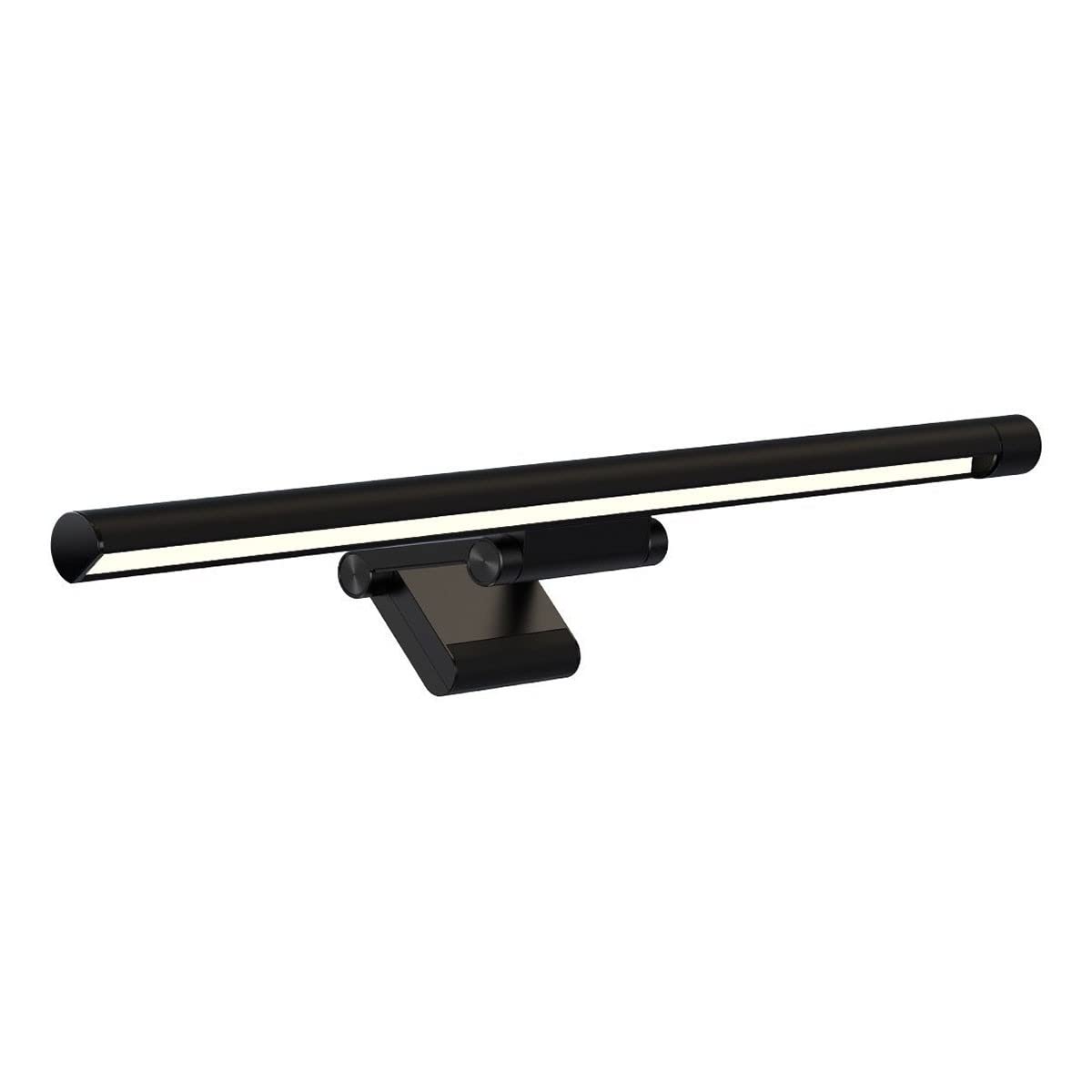
A light bar is a long, thin LED strip in a metal housing that sits on top of your monitor, held there by a weighted counterbalance clip rather than a screw or clamp. It draws power over USB, usually from the monitor's own USB port or a hub on your desk.
The trick is not the LEDs. It is the shape of the housing and the angle of the light. The bar is designed so that light throws forward and down onto the desk surface in front of you, and almost nothing bounces backward onto the screen. A normal desk lamp sprays light in a cone in every direction, which is why some of it always lands on the glossy panel and comes straight back at your eyes. A light bar cuts the cone off.
The second thing it does is free up desk space. A lamp needs a base, and the base takes up the corner of the desk that you actually wanted for a mug or a notebook. A light bar takes zero desk area because it is not on the desk.
The specs that matter, and why
Stepless dimming. Bars that jump between three or four fixed brightness levels are frustrating because the right level for your room is almost always between two of them. Stepless means a continuous dial. This matters more than it sounds like it should.
Adjustable colour temperature. A cold, bluish white is fine at 4pm and unpleasant at 11pm. Being able to warm the light down for evening use is the difference between a bar you leave on and one you stop using. Look for a range that goes properly warm, not just "slightly less blue".
The mounting clip. This is where cheap bars fail. A counterweight clip is designed for a specific range of monitor bezel thickness and back curvature. On a very thin bezel or a monitor with a sharply curved rear panel, a poorly designed clip will sit at an angle or slide. Check the shape of your monitor's top edge before ordering.
Power source. USB power sounds simple until you realise your monitor has no USB port, your laptop has two ports and both are in use, and now you are buying a hub as well. Plan where the power is coming from.
Where a light bar genuinely helps
If you work late in a dim room, this is the product's home ground. The light lands on your hands and your desk, the screen stays clean, and the contrast between the bright screen and the pitch-black room around it drops. That contrast gap is a real thing your eyes work against.
It also helps if you write on paper next to your keyboard. Anyone who takes handwritten notes during calls, marks up printouts, or works with physical documents alongside a screen gets more out of a light bar than a pure typist does.
Small desks benefit disproportionately. If your working surface is a 90cm table in a rented flat with the monitor already eating a third of it, reclaiming the lamp's footprint is worth real money.
Where it disappoints
It does not light a room. Some people buy one expecting to stop using overhead lighting entirely. A light bar lights roughly the desk and a little beyond. Working in total darkness with only a light bar on is not comfortable and defeats the purpose.
It does nothing for glare from a window. If your problem is afternoon sun hitting the screen, this is the wrong purchase. You need a curtain or a different desk position.
Laptop users get much less from it. The clip is designed for a monitor's depth and weight. On a laptop lid it is awkward at best and unstable at worst. If you work on a laptop alone, a small clip-on lamp or a better seating setup will do more for your comfort than this will.
The price is real. A perfectly adequate table lamp costs a few hundred rupees. A light bar costs several times that for a narrower job. If glare on your screen has never actually bothered you, you do not need one.
Who should skip it: anyone who works mostly in daylight, anyone on a laptop without an external monitor, and anyone whose desk lamp already sits far enough to the side that it causes no reflection. This is a fix for a problem you should be able to name.
Practical notes on living with one
Set it dimmer than you think. The instinct is to run it near full brightness, which makes the desk brighter than the screen and creates a new contrast problem in the opposite direction. Aim for the desk being roughly as bright as a white document on your monitor.
Warm it down after sunset. Not because of any dramatic claim about sleep, but because warm light at night is simply easier to sit under for three hours.
Route the USB cable down the back of the monitor stand and into a cable tray if you have one, otherwise it dangles across your field of view and undoes the tidiness you bought the thing for.
Wipe the bar occasionally. It sits horizontally at the top of your monitor, which means it collects dust faster than anything else on the desk, and dust on the diffuser dims the output.
On eye strain generally: better lighting reduces the effort of switching between a bright screen and a dark desk, and many people find that helps. This is general information, not medical advice. Persistent eye pain, headaches or blurred vision are worth taking to an optometrist rather than solving with a gadget.
The one we have listed
We currently have the Baseus i-Wok Monitor Light Bar listed at Rs 3,999 on Amazon.in. It rates 4.4 stars, though on a small base of 12+ ratings, so treat that number as thin rather than proven.
It clips onto the monitor, runs on USB, and offers stepless dimming with adjustable warmth, which covers the two specs that matter most. The rating count is the honest caveat here: it is a well-regarded design from a known accessories brand, but there is not yet a large pile of Indian buyer feedback behind this particular listing.
Worth checking the price yourself before buying. Listed prices on Amazon.in move frequently, and this category in particular sees swings.
Common questions
Will it work on a curved monitor?
Usually yes, but the fit is less secure. Counterweight clips are designed around a flat rear panel. On a strongly curved monitor the bar may sit slightly nose-down. Check the clip design against your monitor's top edge before ordering.
Does it block the monitor's built-in camera?
If your monitor has a pop-up camera at the top centre, a light bar will often sit right over it. Most people using a light bar have a separate webcam anyway, but it is worth checking.
Can I plug it into a phone charger instead of a computer?
Generally yes, since it is a simple USB load. That also means it stays on when the computer is off, which some people prefer.
Is it better than just turning on the ceiling light?
For lighting the desk without touching the screen, yes. For lighting a room, no. They do different jobs and most setups end up using both at low levels.
Disclosure: TechBelievers lists products from Amazon.in and other stores as an affiliate. If you buy through our links we may earn a commission, at no extra cost to you. Prices are checked periodically and change often on the store's own site.