Monitor arms: what a gas spring arm actually fixes
By four in the afternoon you catch yourself doing it again. Chin pushed forward, shoulders rolled in, eyes angled down at a screen sitting on the stand it shipped with. Most factory monitor stands put the middle of the panel somewhere around your collarbone when you are actually sitting upright. So you either slouch down to meet it, or you spend a month quietly building a plinth out of old textbooks, a router box and one unopened parcel you keep meaning to return.
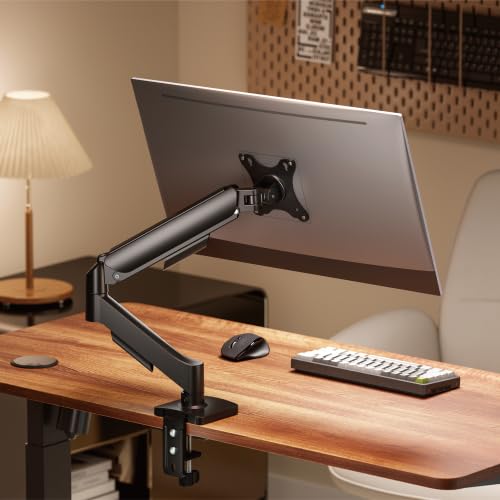
A monitor arm is the boring fix. It is a clamp, two or three joints and a spring. It does one job: it puts the screen where your eyes already are, and keeps it there when you nudge it.
How a monitor arm actually works
Three parts matter. At the desk end there is a mount, usually a C-clamp that grips the back edge of the desk, or a grommet bolt that drops through a hole in the desktop. In the middle there is the arm itself, with joints that let it extend, fold and swivel. At the screen end there is a square plate with four bolt holes that attaches to the back of your monitor. That square is the VESA pattern, and it is the single thing most people forget to check.
The difference between a cheap arm and a good one is how it holds height. A static arm has a bolt you loosen and tighten every time you want to move the screen, which in practice means you set it once and never touch it again. A gas spring arm has a sealed piston inside that pushes up against the weight of your monitor. Set the tension correctly and the screen floats. Push it down with one finger and it stays down. Lift it and it stays up. That sounds like a small thing until you have used one for a week.
Spring tension is adjustable, normally with a hex key through a hole in the arm. Get it wrong in one direction and the screen sags overnight. Get it wrong in the other and the arm slowly creeps upward on its own. Ten minutes of fiddling on day one sorts it out permanently.
The specs worth checking before you order
Where an arm genuinely helps
The obvious one is neck and eye height. Rough guide: sitting normally, the top of the screen should be at or slightly below eye level, and the panel about an arm's length away. An arm gets you there in seconds instead of approximately.
The second gain is desk space. A monitor foot eats a surprising amount of surface, and it eats the most useful part, the strip directly in front of you. Clamp the screen to the back edge and that strip comes back. If you write by hand, eat lunch at your desk, or share the desk with anyone, this is the change you notice daily.
Third, it makes a shared or small setup workable. Renting a flat where the only sensible desk is a 100cm table in a corner is very normal. Pushing the screen back and out over the edge buys you depth you did not have. Swinging the monitor sideways so someone can look at it, then swinging it back, takes two seconds.
Where they disappoint
Wobble is real. Any arm transmits desk movement to the screen. On a light table, or one of those adjustable-height frames, typing hard makes the picture jiggle a little. A heavier desk fixes it; a lighter arm does not.
Clamps mark desks. A soft laminate or veneer top will show a compression mark under the clamp pad after a few months. Use the supplied rubber pads, and if you are renting furnished, think about it before you clamp.
Gas springs weaken with time. Not dramatically, but after a couple of years you may find yourself re-tightening the tension. Cheap ones weaken faster.
And some people simply do not need one. If your monitor stand already adjusts for height and tilt, an arm buys you desk space and swivel and not much else. If you use a laptop as your only screen, you want a laptop stand and an external keyboard, not this.
Setting one up without regret
Assemble the arm fully before you attach the monitor, and attach the monitor while it is lying face down on a towel. Do not hold the screen with one hand and drive bolts with the other.
Get the clamp genuinely tight, then check it again after a week. It settles.
Route the cables before you fine-tune the height, otherwise the cable tension itself fights the spring and your careful adjustment goes out the window.
Leave slack. An arm that can extend 40cm needs 40cm of spare cable, or you will yank the HDMI out the first time you swing it.
The one we have listed
The Jin Office Single Monitor Gas Spring Arm covers 13 to 32 inch screens up to 10kg, clamps to the desk edge, and swivels, tilts and rotates to portrait one-handed. It routes cables through the arm and carries a one-year warranty. It is listed at Rs 2,988 on Amazon.in and rated 4.7 stars across 600+ ratings.
The reason it is worth a look is mostly the price bracket. A lot of people assume a proper gas spring arm is a five-figure purchase from an ergonomics brand, decide against it, and go back to the textbook plinth. Under Rs 3,000 changes that maths. Prices move, so check the store page before you buy.
If you are already reworking the desk, a monitor light bar and an under-desk cable tray are the two things people usually add next, and both work better once the screen is off the desk surface.
Common questions
Will it fit my monitor?
Check for four bolt holes in a square on the back, 75mm or 100mm apart. No holes means no arm, unless you buy a VESA adapter bracket made for your model.
Is a gas spring worth paying more for than a static arm?
If you will move the screen more than once a month, yes. If you will set it and forget it, a static arm does the same job for less.
Can I put a very light monitor on a 10kg arm?
Sometimes it works and sometimes the arm drifts upward because the screen cannot hold the spring down. Check the minimum weight in the listing, not just the maximum.
Does the clamp damage a glass or thin desk?
Glass tops are a no unless the arm specifically says otherwise. Thin hollow-core tops can bow. Solid wood, plywood and thick laminate are fine with the rubber pads fitted.
Disclosure: TechBelievers lists products from Amazon.in and other stores as an affiliate. If you buy through our links we may earn a commission, at no extra cost to you. Prices are checked periodically and change often on the store's own site.