Laptop Stands: What Raising Your Screen Fixes, And What It Does Not
You notice it around four in the afternoon. There is a dull ache at the base of your skull, your shoulders have crept up towards your ears, and you have spent six hours looking down at a laptop sitting flat on a dining table. The machine is doing fine. Your neck is absorbing the entire design compromise.
That compromise is built into every laptop ever made. The screen and the keyboard are welded to each other, so one of them is always in the wrong place. Put the keyboard where your hands want it and the screen is too low. Put the screen where your eyes want it and you are typing at chest height. A laptop stand picks a side, and understanding which side it picks is the whole story.
What a stand is actually doing
Your head weighs somewhere around five kilograms. Held upright over your spine, the muscles at the back of your neck barely have to work. Tip it forward fifteen degrees to look down at a screen and the load those muscles carry roughly doubles. Tip it further and it climbs again. Nothing dramatic happens in an hour. Over months of eight-hour days, it shows up as that four o'clock ache.
The standard ergonomic target is simple: the top of the screen roughly level with your eyes, so your gaze drops slightly rather than your whole head. On a 14-inch laptop on a normal dining table, the top of the screen sits well below that line. A stand closes some or all of the gap by tilting and lifting the chassis.
The second thing it does is lift the underside off the table. Most laptops pull cooling air in through vents on the bottom panel. Flat on a desk they cope; flat on a bed or a sofa cushion they choke, the fans spin up, and the chip quietly throttles. A few centimetres of clearance is worth more than it sounds.
The formats you will run into
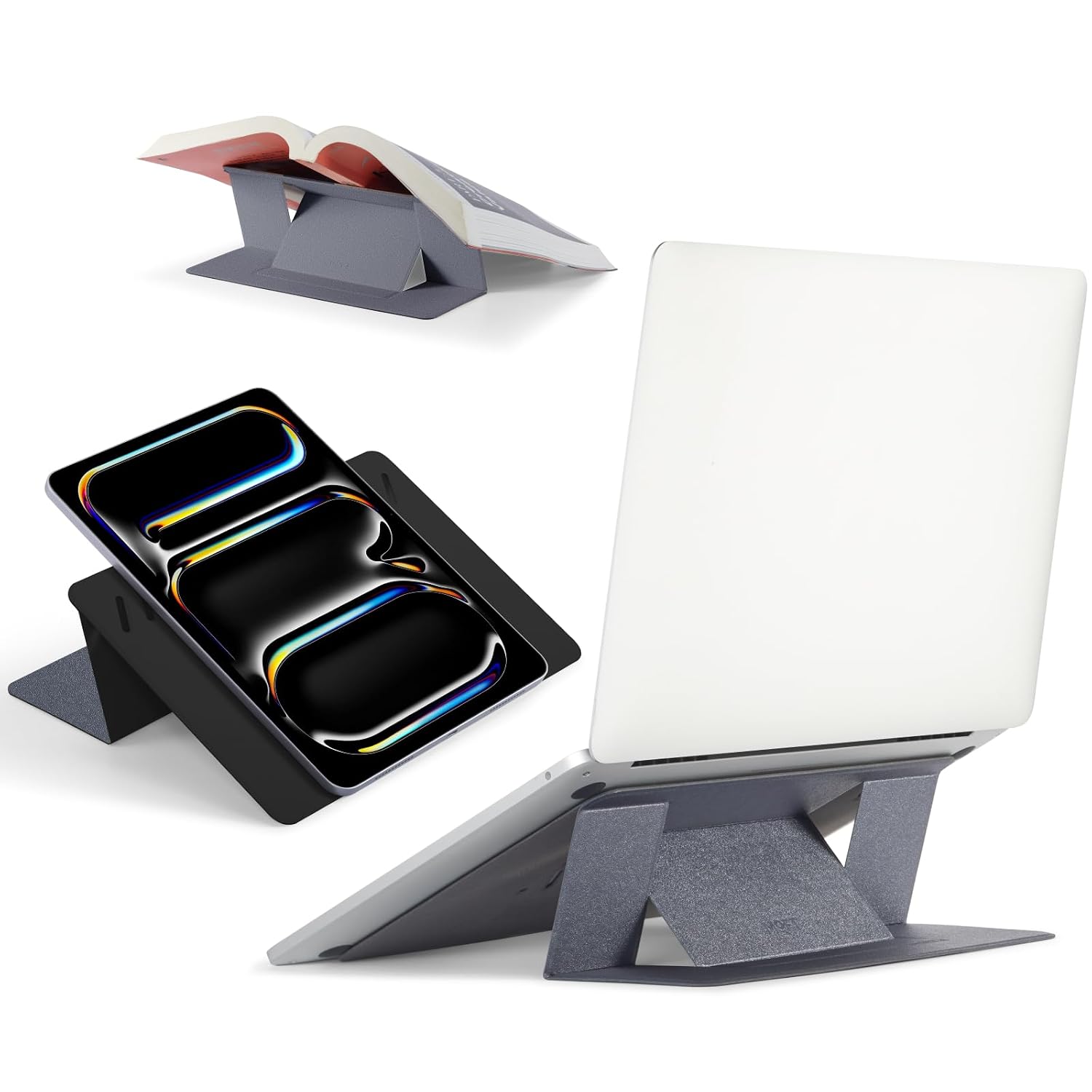
- Slim folding risers. A few millimetres thick, made of layered card, plastic or thin metal. They fold out into a wedge and collapse flat. Some stick to the laptop lid permanently, some sit loose underneath. These give you two or three low angles, not real height.
- Z-shaped aluminium risers. The rigid bent-bar type. Stable, good airflow, moderate lift, and they live on your desk rather than in your bag.
- Adjustable arm stands. Hinged legs that raise the laptop towards genuine eye level. The most ergonomically correct and the least portable.
The specs worth checking
Lift height and angle. Ask what the stand actually raises the screen by, not how many levels it claims. A riser that adds four centimetres is a typing-angle accessory. One that adds fifteen is a posture tool.
Laptop size and weight rating. Slim risers are usually specified for a size band, and 11 to 14 inches is common. Put a heavier 15 or 16-inch machine on one and you get flex and wobble even if nothing collapses.
Stability under typing. The spec nobody publishes and everybody notices. Press a key hard on a wobbly riser and the whole screen bounces. Reviews tell you more here than product pages do.
Folded thickness. If it goes in a bag every day, anything much over a centimetre becomes the thing you leave at home.
Vent clearance. Check that the stand does not sit across the intake grille. Some designs lift the laptop and then block the vents they just exposed.
The part most people skip
Raise the screen properly and your keyboard goes up with it. Now you are typing somewhere near your ribcage, which trades a neck problem for a shoulder and wrist problem. A stand that lifts the screen to eye level only works if you add an external keyboard and mouse and leave the laptop's own keyboard unused.
Low folding risers dodge this by only tilting a few degrees. That is a real if modest improvement in wrist angle and screen height, and you carry on typing as normal. It is the honest trade: small gain, no extra kit. The big ergonomic win costs you a keyboard, a mouse and desk space. A wrist rest set is a cheap addition once you have gone down that road.
Where a stand genuinely helps
- You work at the same table most days and already have, or will buy, an external keyboard.
- Your laptop runs hot during long calls or exports and sits flat on a hard surface.
- You hot-desk or work from cafes and want a small tilt improvement you can carry.
- You pair a laptop with a second monitor and want the two screens closer in height.
Where it disappoints
- If you only use the laptop keyboard. Beyond a small tilt you are moving the problem, not solving it.
- If your chair and table height are wrong. A stand cannot fix a table that is too high or a chair with no back support. Fix the seat first; that part is usually free.
- If you work on the sofa or in bed. Most stands assume a flat rigid surface. On soft furniture they slide or sink.
- If you expect cooling. A riser improves passive airflow. It is not a cooling pad with fans, and it will not stop a thermally limited machine from throttling under sustained load.
- If you carry a heavy 16-inch workstation. Slim risers are simply not built for it.
Practical notes
Set the height with your eyes closed. Sit normally, shut your eyes, hold your head neutral, then open them. Where you are looking is where the top of the screen should be. Most people set stands too low, because low feels familiar.
If you rent and cannot change the furniture, a stand plus a separate keyboard is the cheapest way to make a standard dining table workable, and it packs away when the table has to be a table again.
In a humid monsoon month, wipe the contact pads now and then. Dust plus damp makes silicone grip pads slick, and a slick pad is how a laptop slides off a tilted stand.
The one we have listed
We currently list the MOFT Invisible Laptop Stand at Rs 5,877 on Amazon.in. It is the wafer-thin folding type: it opens into two viewing angles, folds flat so it is barely there in a bag, and this version is non-adhesive, so nothing sticks to your lid. It is specified for 11 to 14 inch laptops and holds a 4 out of 5 rating.
Buyers consistently mention the sturdiness and the posture improvement, and iMore rated the convenience highly. The recurring complaint is wobble with heavier 14-inch machines, which is the known ceiling of this whole category rather than a defect in this one product. At this price it is a premium pick, and the value is in the thinness and the fold rather than in raw lift. If you want maximum height at a fixed desk, an adjustable arm stand will do more for less money.
Skip it if you never move your laptop and want true eye-level height, or if your machine is a heavy 15 or 16-inch model.
Common questions
Will a laptop stand fix my neck pain?
It can reduce one common contributor, sustained forward head posture. It will not fix pain coming from your chair, your mattress, stress or an existing injury. This is general information, not medical advice. If the pain is persistent or radiating down an arm, see a physiotherapist or doctor.
Do I really need an external keyboard?
For low-tilt folding stands, no. For anything that lifts the screen more than a few centimetres, yes, otherwise your shoulders take the hit instead of your neck.
Does a stand replace a cooling pad?
No. It improves passive airflow by lifting the intake off the table. A cooling pad adds forced air. If your laptop throttles during long renders, you want the fans.
Are adhesive stands safe for the laptop lid?
Generally yes while attached, but removal can leave residue or marks on some finishes. If you resell your machines, choose a non-adhesive design.
Disclosure: TechBelievers lists products from Amazon.in and other stores as an affiliate. If you buy through our links we may earn a commission, at no extra cost to you. Prices are checked periodically and change often on the store's own site.