Label Printers at Home: What a Small Thermal Printer Actually Solves
The router died on a Sunday and the replacement needed the old power brick. Six identical black bricks in the drawer, all with slightly different barrel plugs, none of them marked. Twenty minutes of plugging things in until something lit up. That drawer exists in almost every home, and it is the exact problem a small label printer solves. Not office logistics. Not warehouse inventory. Just the ordinary business of knowing what something is without testing it.
How a thermal label printer actually works
There is no ink. A thermal print head heats tiny dots against paper that has been chemically treated to darken where it is heated. The label comes out black-on-white in a second or two, and the only consumable is the label roll itself. That is why these machines are small, cheap to run and almost maintenance-free. There is nothing to clog, dry out or replace except the paper.
The trade-off is built into the chemistry. Thermal labels darken with heat, so anything hot will mark them, and prolonged sunlight will eventually fade them. A label on a spice jar inside a cupboard will still be readable in three years. A label stuck on a car dashboard organiser will go grey over one Indian summer. Worth knowing before you start labelling everything you own.
Almost all consumer models now skip the computer entirely. You pair the printer to your phone over Bluetooth, type into an app, pick a template and print. The app does all the real work, choosing font, size, barcode and QR layout. The printer is a small heater with a battery.
The specs that actually matter
Where it genuinely helps
Cables and chargers are the obvious win, and the payoff is immediate. Label the brick, not the cable. The brick is the part you cannot identify by looking at it.
Kitchen storage is the second. If you decant rice, dals and spices into identical jars, the label is what makes decanting worth doing at all. Thermal labels handle fridge and freezer temperatures without curling off, which handwritten masking tape does not.
Renting adds a use nobody mentions: marking what is yours. In a shared flat, labelling your shelf of the fridge, your extension board and your storage boxes removes a lot of low-grade friction, and the labels peel off when you move out.
Then there is paperwork. File folders, document envelopes, the box of warranty cards and appliance manuals. A printed spine label is often the difference between a filing system you use and a stack you avoid.
The best trick is QR codes on storage boxes. Print a code pointing to a note that lists the contents, stick it on the outside, and you stop opening four boxes to find the winter quilts.
Where it disappoints
The novelty wears off in about a fortnight. Most people label everything in one enthusiastic evening and then use the printer three times a year. That is fine, but it means the honest question is whether you have recurring labelling to do, not whether labelling feels satisfying. It feels very satisfying. That is a different thing.
Label cost adds up quietly. A roll is inexpensive, but printing wide empty margins around short words wastes a surprising amount of tape. Find the setting that trims label length before you get through your first roll.
Adhesive on textured or oily surfaces is unreliable. Rough plastic crates, powder-coated metal and anything that has lived near a cooking hob will shed labels within weeks. Wipe the surface with alcohol first, or accept that you will re-label.
The fading is real. Do not use thermal labels for anything that must stay legible for a decade, such as property papers, medical files or archival storage. Use a pen for those.
Skip a label printer entirely if your need is a dozen jars, once. A marker and masking tape does that for twenty rupees. This is a tool for people who reorganise regularly, run a small business with stock, or live somewhere things genuinely get lost.
Practical notes once you own one
Keep the printer and one spare roll in the same drawer, or the habit dies. Store rolls away from heat. A printer and rolls left in a car boot through May can come back partly darkened and useless.
If you start seeing thin vertical white lines in the print, clean the print head with isopropyl alcohol on a cotton bud. That is dust, not failure.
Print one test label before a batch. Mismatched label width settings in the app are the single most common cause of wasted tape.
For anything you want to keep track of long term, treat the label as the index and not the record. Keep a plain text list somewhere too.
The one we have listed
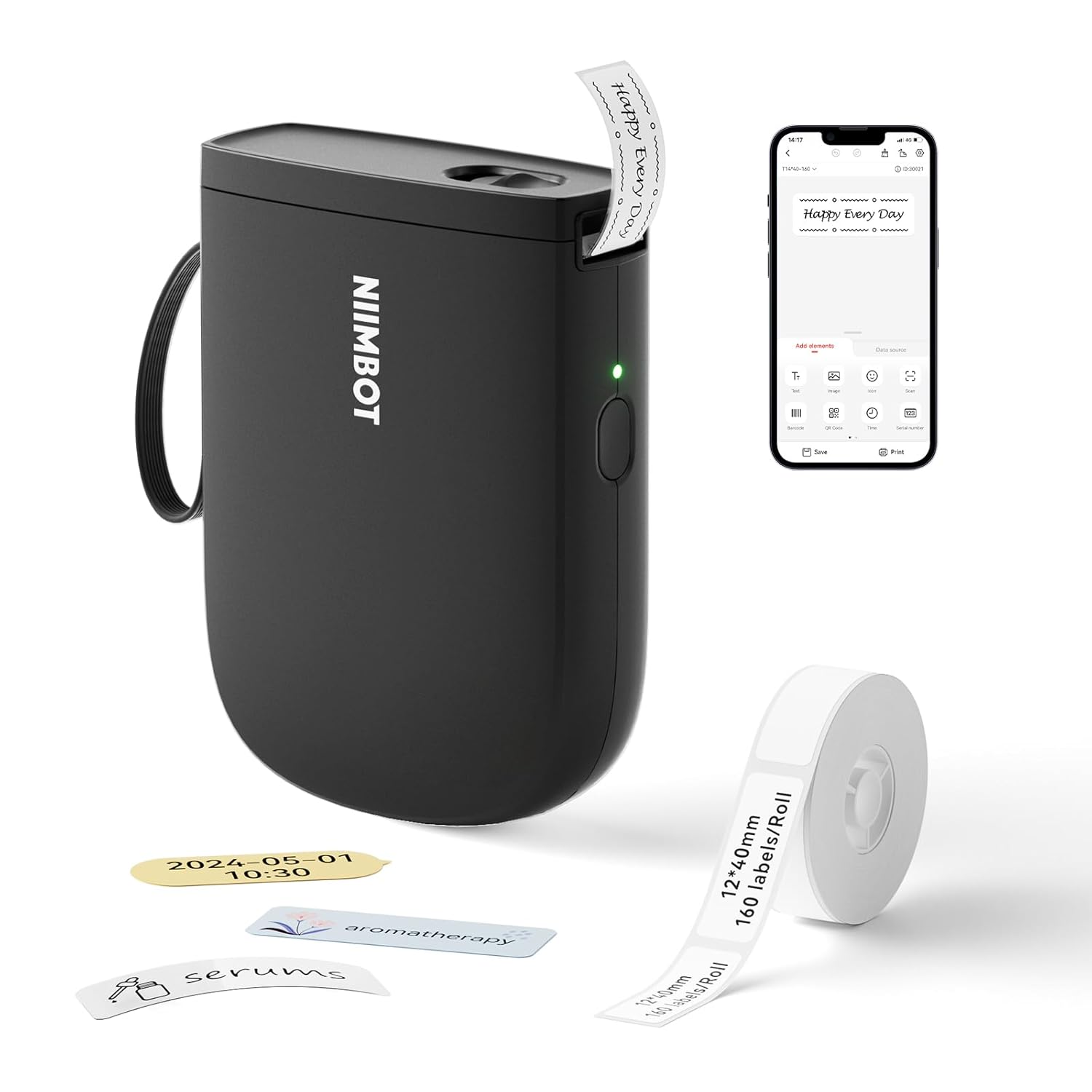
We have the NIIMBOT D11 Bluetooth Label Printer (300 DPI, upgraded) listed at Rs 2,998 on Amazon.in, rated 4.5 out of 5 from 291 ratings. The 300 DPI version is the one worth having if small text or QR codes are part of your plan, since the older 203 DPI units are noticeably softer on fine detail.
It is palm-sized, runs on a rechargeable battery, pairs to a phone over Bluetooth and prints in roughly two seconds. Buyers repeatedly mention that the app is easy to use and that labels survive fridge and freezer use, which is the failure people most often worry about.
Rs 2,998 is not an impulse buy, so be honest about frequency. If the answer is that you have three storage cupboards and a small business running out of the spare room, it pays for itself quickly. If the answer is the spice jars, it does not.
Two related listings if the underlying problem is clutter rather than labelling: a cable management box for the extension board tangle, and vacuum storage bags for seasonal clothes, which are the single best thing to put a QR label on.
Common questions
Does it need ink or toner?
No. Thermal printing uses heat on treated paper. The only thing you buy again is label rolls.
Will the labels come off cleanly?
On smooth, clean surfaces such as glass, hard plastic and metal, usually yes, especially within the first year. On paper, cardboard and textured plastic, expect tearing or residue.
Can I print in Hindi or other Indian languages?
That depends on the phone app and the fonts it supports, not on the printer itself. Check current app reviews for your language before buying, because app support changes with updates.
Is 300 DPI worth the extra money?
If you only print names on jars, no. If you print QR codes, barcodes or two lines of small text on a narrow label, yes. That is exactly where 203 DPI falls apart.
Disclosure: TechBelievers lists products from Amazon.in and other stores as an affiliate. If you buy through our links we may earn a commission, at no extra cost to you. Prices are checked periodically and change often on the store's own site.