How to Automate a Switch You Are Not Allowed to Rewire
Read almost any home automation guide and you hit the same wall by paragraph three. Replace your switch plate. Run a neutral wire to the switch box. Get an electrician in. Fine advice if you own the place. Useless if you are one of the millions of people renting a flat where drilling a second hole in the wall is a conversation with the landlord.
The workaround is less elegant than a proper smart switch and considerably more practical. Instead of changing the electrical system, you leave it exactly as it is and put a small machine in front of it.
The three ways to automate without touching wiring
Smart plugs
The obvious first step. Anything that plugs into a socket and has a physical on-off switch that stays in the on position can be automated with a smart plug. Lamps, fans on a regulator left on, air purifiers, water pumps for a small tank, phone chargers you want cut off at night.
The limitation is what they cannot do. A device with a soft-touch power button will not turn on just because power returned. Your washing machine, most air conditioners and many coffee machines fall in this category. Cutting and restoring power to them just leaves them in standby.
Infrared blasters
For anything with a remote control, an IR blaster copies the remote's signals and replays them from an app. Air conditioners, televisions and set-top boxes are all fair game. Cheap, effective, and it needs line of sight to the appliance, so one per room.
Switch-pushing robots
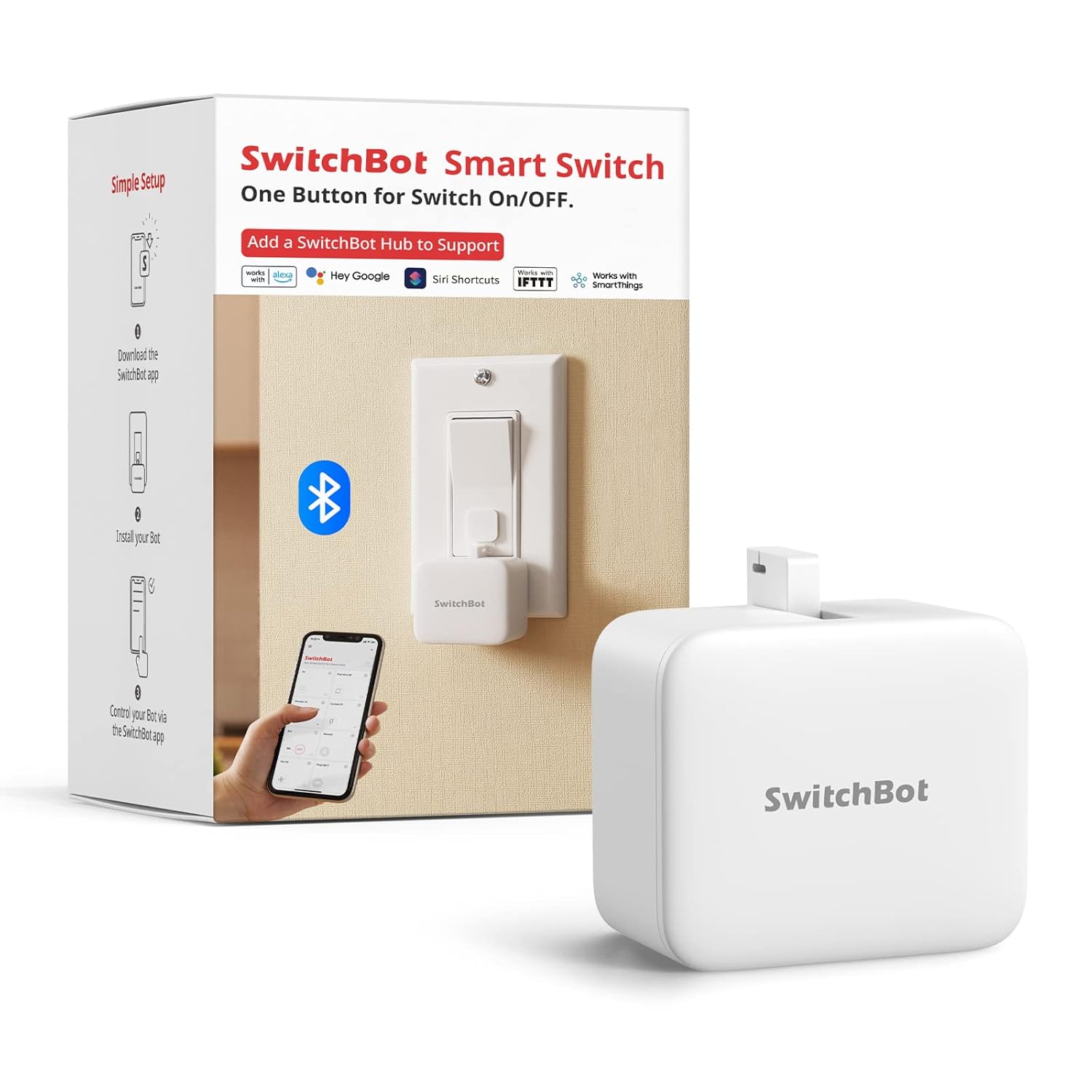
This is the odd one, and the one that covers the gaps the other two leave. It is a small battery-powered box with an arm that comes out, presses whatever is in front of it, and retracts. You stick it next to a switch or button with adhesive tape. It does not know or care what it is pressing.
That mechanical simplicity is the point. The geyser switch, the light switch by the door, the physical power button on a coffee machine, the socket switch behind the fridge. Anything a finger can press, this can press.
Where a pusher robot earns its place
The things nobody mentions before you buy
These are the practical realities, and they matter more than any feature list.
The safety part, briefly
A pusher robot is mechanical and does not touch mains wiring, which is exactly why it is renter-friendly. That said, two sensible limits. Do not automate a heating appliance to switch on when nobody is home, particularly a geyser or anything with an element. And do not use it on a switch controlling something that could be dangerous if it started unattended.
Automation is at its best for turning things off. That is the half of the job with no downside.
What this costs against the alternative
A proper smart switch module runs roughly Rs 1,500 to Rs 2,500 per switch, plus an electrician, plus a neutral wire that many older Indian switch boxes simply do not have. Then you leave the flat and either abandon the hardware or spend another visit undoing it.
A pusher robot costs more per point than a smart plug and less than rewiring. It peels off in ten seconds and moves house with you. If you expect to move within two or three years, that portability is most of the value.
The one we have listed
The SwitchBot Bot is on our deals list at Rs 3,499 on Amazon.in, rated 4.5 stars across more than 27,000 ratings. That review count is unusual for this category and is the main reason it is the one we list. It is roughly matchbox sized, sticks on with included 3M adhesive, runs schedules and timers over Bluetooth from the app, and works with Alexa and Google Assistant once you add a SwitchBot Hub. The quoted battery life is around 600 days.
It is worth being clear that Rs 3,499 for one switch is not cheap, and if all you need is to automate a lamp then a Rs 800 smart plug is the better purchase. The Bot makes sense specifically where a plug cannot help: a wall switch, a geyser, or a physical button on an appliance.
Common questions
Do I need the hub?
Only if you want control from outside Bluetooth range or voice control. Schedules set in the app run on the device itself and work without a hub or internet.
Will it work on any switch?
It works on most standard rocker switches and push buttons. Very stiff industrial switches, recessed buttons, and switches with no flat surface beside them for mounting are the awkward cases. Measure the space next to your switch before ordering.
What happens during a power cut?
The Bot runs on its own battery, so it keeps working. Whatever it switches obviously does not.
Is a smart plug not simpler?
Yes, and cheaper, and you should use one wherever it works. The Bot is for the cases where it does not.
Disclosure: TechBelievers lists products from Amazon.in and other stores as an affiliate. If you buy through our links we may earn a commission, at no extra cost to you. Prices are checked periodically and change often on the store's own site.